Cartoreader Lite’s documentation
Quick Start
Introduction
This repository is an inofficial reader to easily process exported CARTO3 data in Python. It does not provide the more extensive capabilities to analyze the signals, such as OpenEP, but is rather meant as a simple reader to import CARTO data. The loaded time data is imported in pandas and the meshes in VTK provided through PyVista, allowing for easy access, export and interoperatibility with existing software.
CARTO3 System
The read file format is the output of the CARTO3 system, which is used as an electrical mapping device for guiding catheter ablation and catheter synchronization therapy. For more details, please read the official website of Biosense Webster (https://www.jnjmedicaldevices.com/en-US/product/carto-3-system).
Carto3 System
CARTO 3 System Version 7 and the CARTO PRIME® Module offers advancement in 3D mapping technology. From signals to diagnosis, across a wide range of electrophysiology procedures, we are reframing the future of electrophysiology.
A short description can also be found in this documentation at CARTO3 File Format.
Installation
To install cartoreader_lite, you have to clone the repository and install the libary using pip.
git clone https://github.com/thomgrand/cartoreader-lite
cd cartoreader-lite
pip install -e .
Usage
To test the library, you first need to get CARTO3 data. None is provided with this repository, but you can download the testing data provided by OpenEP to quickly try out the library (make sure the libary was installed first):
python tests/generate_test_data.py
from cartoreader_lite import CartoStudy
import pyvista as pv
import numpy as np

study_dir = "openep-testingdata/Carto/Export_Study-1-11_25_2021-15-01-32"
study_name = "Study 1 11_25_2021 15-01-32.xml"
study = CartoStudy(study_dir, study_name,
                carto_map_kwargs={"discard_invalid_points": False} #All points of the example are outside the WOI, which would be by default discarded
                )
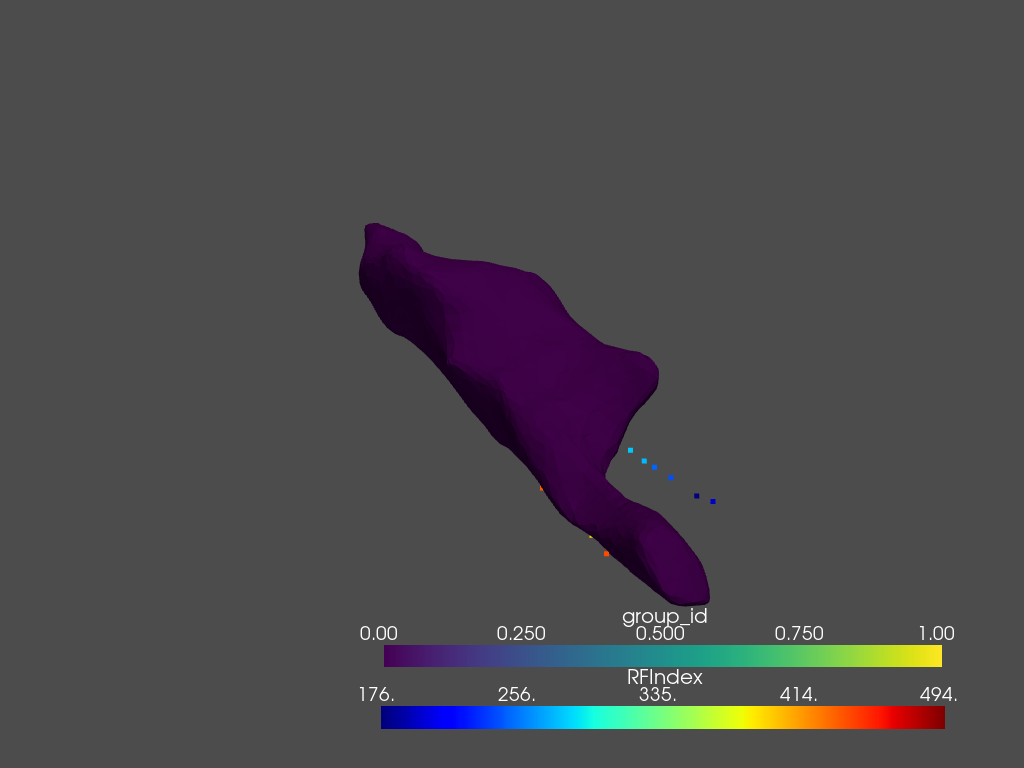
ablation_points = pv.PolyData(np.stack(study.ablation_data.session_avg_data["pos"].to_numpy()))
ablation_points.point_data["RFIndex"] = study.ablation_data.session_avg_data["RFIndex"]
plotter = pv.Plotter()
plotter.add_mesh(ablation_points, cmap="jet")
plotter.add_mesh(study.maps[2].mesh)
plotter.show()
You should see the recorded map of the OpenEP example, together with its recorded points like below.
cartoreader_lite also offers the possibility to directly load the CARTO3 exported zip-files. For the zipped OpenEP testing data, this would like the following:
study_dir = "openep-testingdata.zip"
study_name = "Carto/Export_Study-1-11_25_2021-15-01-32/Study 1 11_25_2021 15-01-32.xml"
study = CartoStudy(study_dir, study_name)
Buffering
Loading the CARTO3 study is heavy on the CPU, which is why it is often useful to backup your studies.
This can be easily achieved through the cartoreader_lite.CartoStudy.save() method
bak_name = "Study 1 11_25_2021 15-01-32.pkl.gz"
study.save(bak_name)
study_bak = CartoStudy(bak_name)
Detailed Content
Module API
Glossary
The following acronyms will be used throughout the documentation.
- ECG
The Electrocardiogram is usually used for electrical recordings of the heart. In this documentation, the term is used for the recordings on the skin.
- EGM
An Electrogram is the general term used for electrical recordings over time. In this documentation, this term is mainly reserved for internal recordings.
- LAT
The Local Activation Time of a point is defined as the point in time at which it is activated.
- RFIndex
Radio Frequency Index, or more commonly ablation index, is a numerical marker associated to each ablation site, used to better quantify the applied ablation force, power and duration according to studies. For more info, see: https://johnsonfrancis.org/professional/ablation-index-to-guide-af-ablation/.
- WOI
CARTO3 defines the Window Of Interest as the time in which recordings are considered valid (e.g. to avoid far field measurements).